
AI-ASSISTED SAREE DESIGN
From idea
to interlacing.
Create coordinated saree artwork. Refine colour, explore weave structures and prepare for Jacquard—all in one workspace.
From the expressive motif to the precise thread grid.
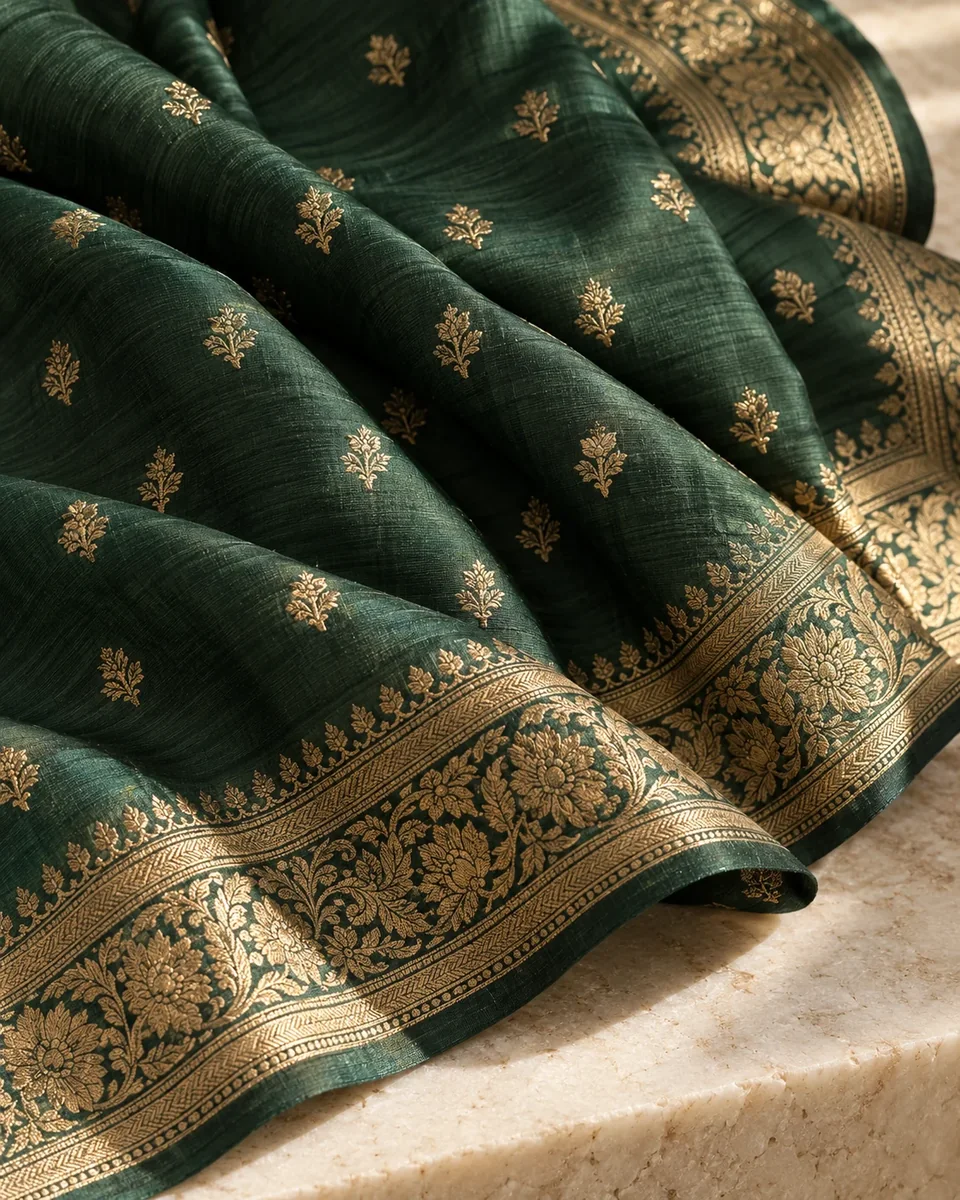
INSIDE THE STUDIO
One workspace.
Every design decision.
Follow an idea through artwork, colour preparation, weave repeats and loom mapping. Explore each stage below.
FROM A SHARED DESIGN DIRECTION
One idea.
A complete saree.
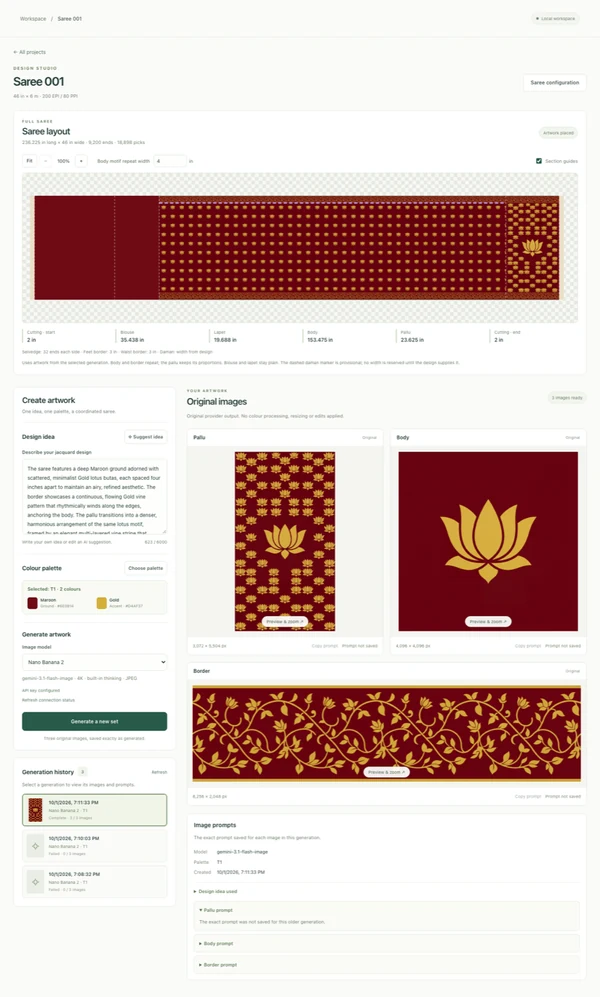
Develop coordinated artwork for the body, pallu, borders and optional daman. Start with a brief and palette, then refine each section without losing the rest of the design.
- Coordinated motifs across sections
- Generation history and original prompts
- Individual section regeneration
FROM PAINTED COLOUR TO THREAD CELLS
Keep the character.
Refine the detail.
Prepare each motif at the dimensions of its physical repeat. Match artwork to a chosen palette, compare the result with the original, and approve the version that belongs in the layout.
- Local colour quantisation
- Original artwork kept unchanged
- Corrections saved in separate versions
01 / The artwork
02 / The thread grid
THE PATTERN BENEATH THE PATTERN
Decide how
the threads meet.
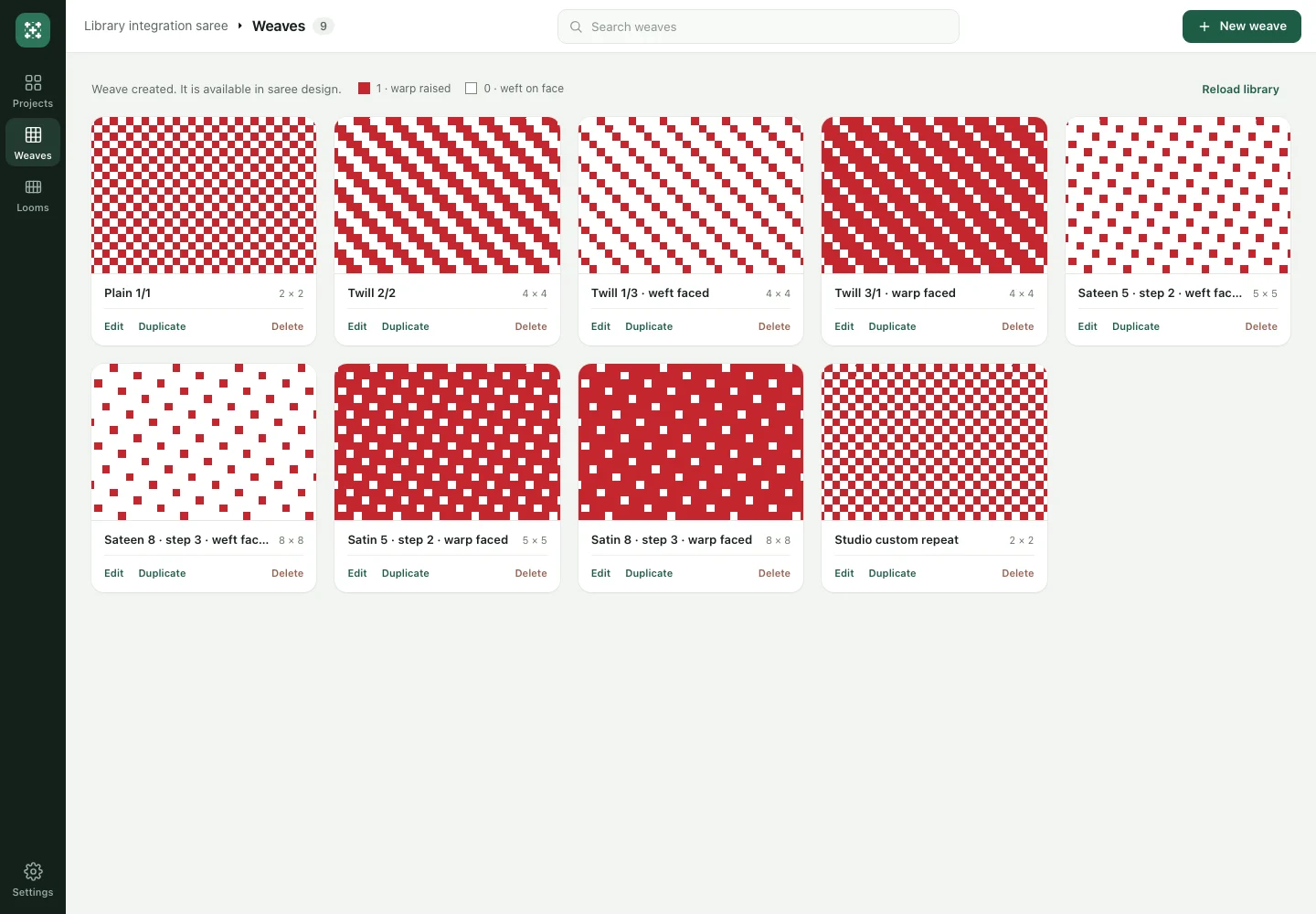
Work with plain, twill, satin and sateen structures, or edit a repeat in the weave library. Assign structures to design colours and feeders, with independent bindings for the two selvedges.
- Editable, reusable weave repeats
- Structure choices for each colour
- Independent edge bindings
PREPARATION WITH CONTEXT
Keep the loom
in the conversation.
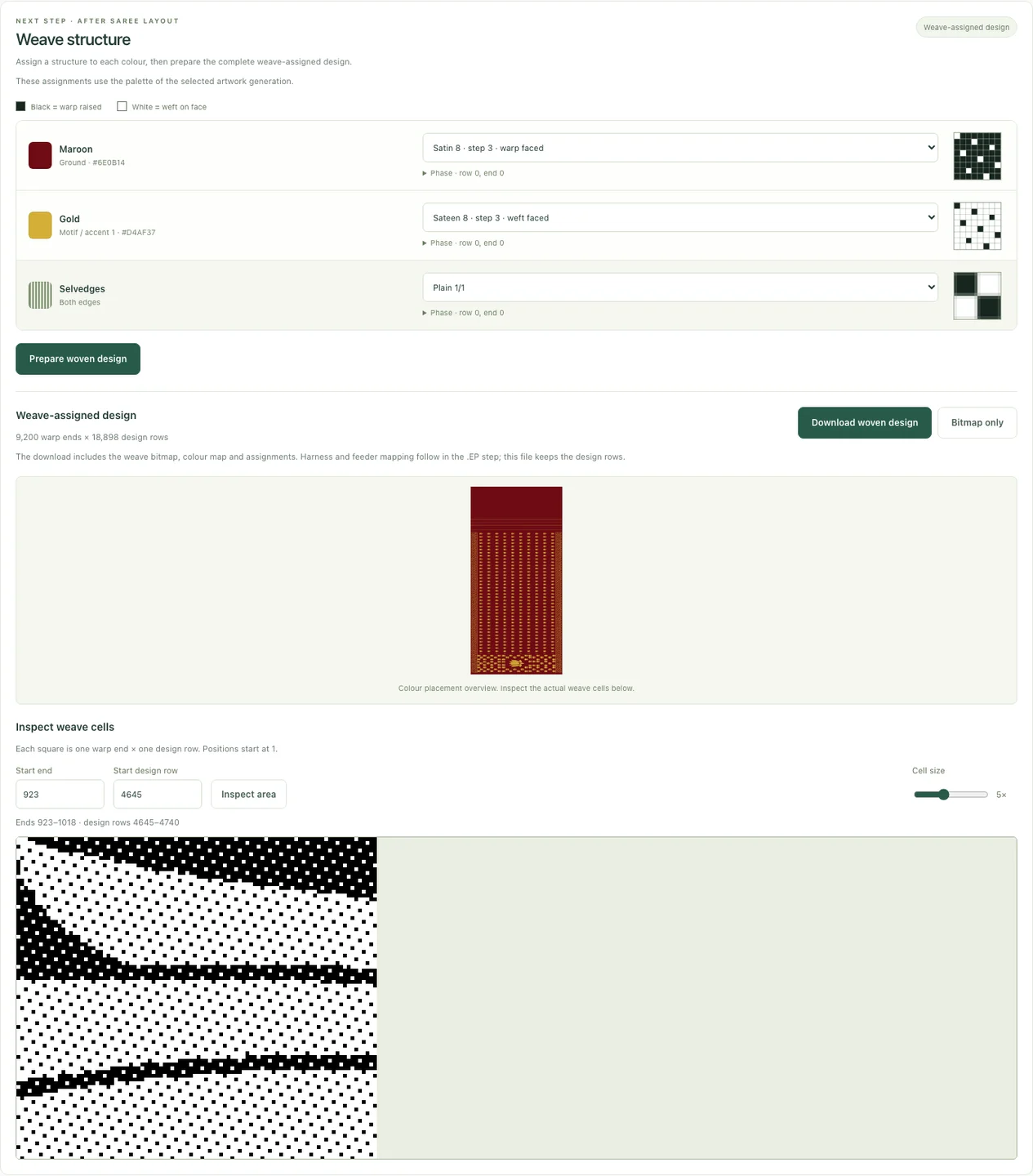
Configure hooks, harness ties and feeder assignments around the selected loom. Prepare woven previews and EP exports with mapping records and machine snapshots.
- Hook and harness mapping
- Feeder assignments and woven previews
- Inspect the decisions behind an export
Designed around the fabric
Originals preserved
Decisions remain editable
Preparation stays inspectable
SELECTED DESIGN STUDIES
A motif becomes
a design language.
Five project-generated artwork studies and one illustrative repeat. Open a study to explore its palette and composition.
Digital design studies. Explore each one to see the thinking behind the pattern.
TRY THE INTERLACING LAB
A little change.
A whole new weave.
See how colour and interlacing work together. Choose a palette, change the structure, and watch the surface take shape.
Plain weave alternates over and under, making a balanced checkerboard of warp and weft.
An enlarged illustration of interlacing, for exploration.
THE WORKFLOW
One creative thread.
Every step connected.
Set the dimensions. Develop the motif. Prepare the thread grid. Keep each decision connected to the whole saree.
01Set the foundation
Start with your loom, saree dimensions and sections. Shape the body, pallu and borders around the fabric you want to create.
02Give the idea a form
Bring a design brief and palette together with AI-assisted artwork. Generate coordinated motifs for the body, pallu, borders and optional daman.
03Refine every detail
Review originals beside prepared motifs, correct colours and quantise the artwork to its physical thread grid. Keep versions as your design evolves.
04Prepare the structure
Assign weave structures, map the loom’s hooks and harness, then prepare woven previews and EP exports for compatibility checks and loom trials.
THE WHOLE DESIGN, IN VIEW
ARTWORK / LAYOUT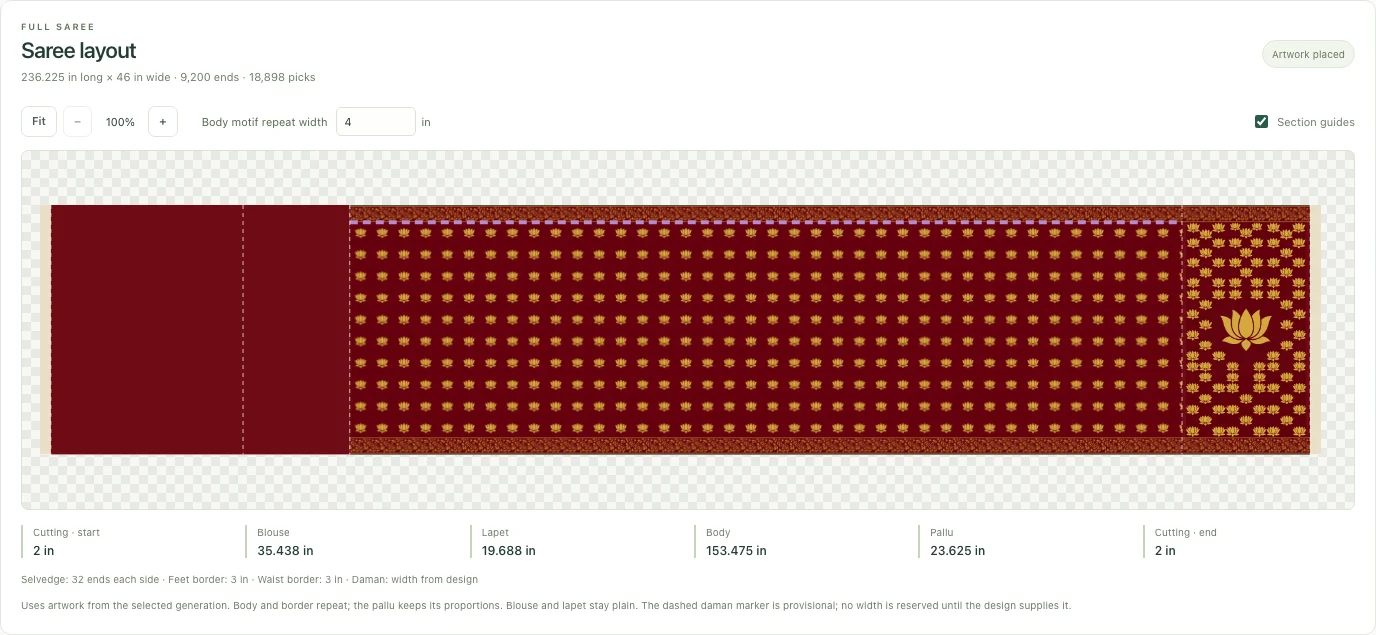
See how a motif moves from an individual study into the rhythm of the full saree.
FIELD NOTES
A closer look
at the craft.
Three short reads on the relationship between a saree’s sections, the thread grid and the structures beneath the surface.
DESIGN THINKING · 2 MIN READ
A saree is a system
of sections.
The body, pallu and borders have different roles. A shared design language brings them together.
COLOUR & DETAIL · 2 MIN READ
Think in threads.
Not just pixels.
Repeat size and thread density shape the detail that can make it from an image into a woven design.
STRUCTURE · 2 MIN READ
Colour is only
half the story.
A motif describes what you see. A weave structure describes how the threads meet to create it.
THE THINKING BEHIND WEFT THEORY
Technology should open
up the craft.
And leave room for the maker.
Weave is a saree design and loom preparation project built around a simple idea: the tools should connect, so the designer can stay with the design.
We bring traditional textile thinking into a digital workspace—from an expressive motif to the precise logic of warp, weft and repeat.
QUESTIONS & ANSWERS
Before the
first pick.
About the workspace, the files it prepares, and the decisions that stay with the maker.
Back inside the studioDo I need a plan, and how does renewal work?
There is no free plan. You need a paid plan or a plan granted by the operator. Monthly subscriptions renew automatically through Razorpay until cancelled. Cancellation takes effect at the end of the current billing cycle: access and plan credits remain until then, with no further renewal charges. Current plans and prices are shown in the app. See our Refund & Cancellation policy for how to request cancellation.
How do credits work, and do they expire?
AI actions consume credits. Plan credits are granted monthly and reset at renewal; unused plan credits do not carry over. Credits bought in one-time packs and any starting grant do not expire. Credits used for failed generations are returned automatically. Payments are processed by Razorpay in INR.
What happens when my storage is full?
Each plan includes a storage allowance for your saved work. When it is full, new jobs are blocked until you delete files or upgrade your plan. Existing work is not deleted automatically.
Can I refine just one part of a saree?
Yes. Regenerate an individual body, border, pallu or daman section while retaining the other approved motifs. Finished versions remain available in the project, so exploring a new direction does not erase the previous one.
Does colour preparation need another AI request?
No. Motif quantisation runs locally. It matches artwork colours to the selected palette at a thread grid derived from the repeat’s physical dimensions and the loom’s thread density.
What happens to my original artwork?
Original images remain unchanged. Colour corrections and prepared motifs are saved as separate versions, so the original stays available for comparison and reworking.
Can the design reflect my loom’s harness?
The workspace supports hook layouts, straight or mirrored body repeats, partial final repeats and multiple adjacent ends per hook. The prepared design and harness mapping must agree before export.
What does the project export?
Woven-design bitmaps and supporting records, followed by EP machine files with previews, feeder assignments and machine and harness snapshots. These records keep the preparation decisions alongside the output.
What still needs checking after an EP export?
Controller settings, polarity and sequencing need confirmation on the target machine, followed by a supervised loom trial. File and harness checks help prepare the design; physical weaving acceptance remains a separate step.
YOUR NEXT DESIGN DECISION